
Club Administrator Alert. The United States Golf Association mandates that you complete an annual assessment. For the first time in 2026, you must complete this task through GHIN Admin Portal.
We thank you in advance for completing this task as soon as possible.
SIMPLE STEP-BY-STEP INSTRUCTIONS
Step 1:
Log in to your club’s GHIN Admin Portal using your email address and password.
Step 2:
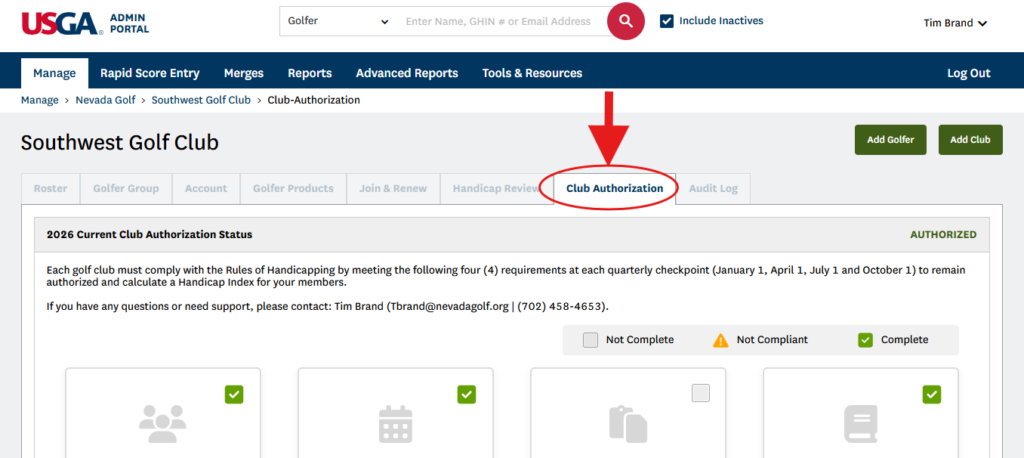
Toggle over to the “Club Authorization” tab located on your club’s home screen.
Step 3:
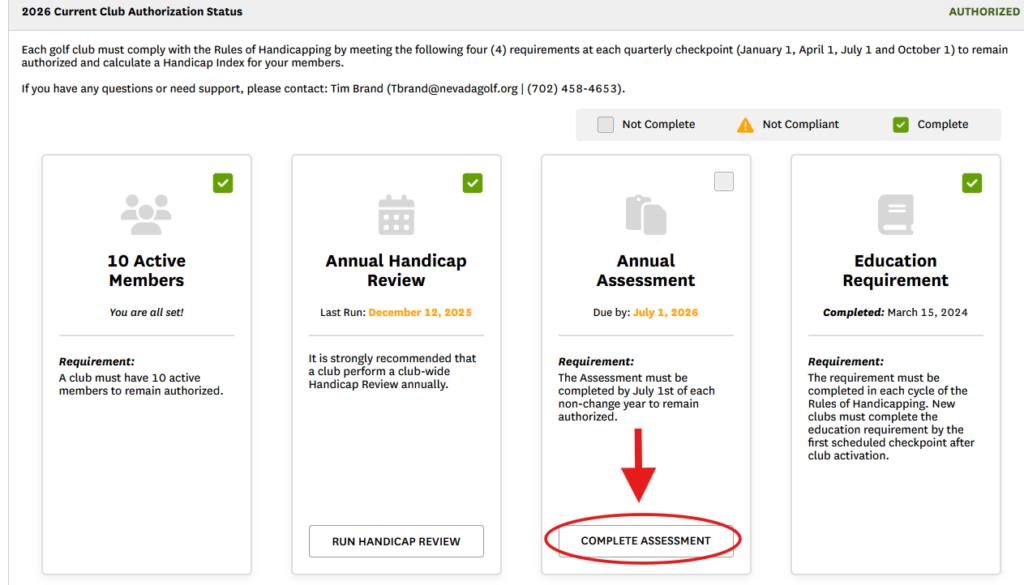
On the Club Authorization page, scroll down to your Annual Assessment. If you have not already completed your 2026 assessment, a link will be provided so you can select and complete your annual assessment.
Step 4:
Fill out the necessary information and submit. That is it! The entire process should take less than a minute, then, you will have completed your club’s annual assessment for 2026.
Should you have questions, please email us at [email protected]